
We started using p5.js for programming, p5.js is a web version like processing. We learned to use processing to do some programming before, so p5.js is more convenient for us to create and design, and it can make some cool websites. Of course there are some differences between processing and p5.js code, so I can use Processing to p5.js converter to convert processing code.


What we learned in class was using sliders to control colour and size.I feel this is a bit like the colour palette in Photoshop. Maybe I can use this in my design later.


Here I learned how to create a button and adjust its position. If he wants to work, we need to set a mousePress to set an order to let it do this. At the same time, if we want to create a space for people to type, we should create Input, and then, it can work.
This time the work was modified from the previous processing work, so I chose a Jumping Ball work.


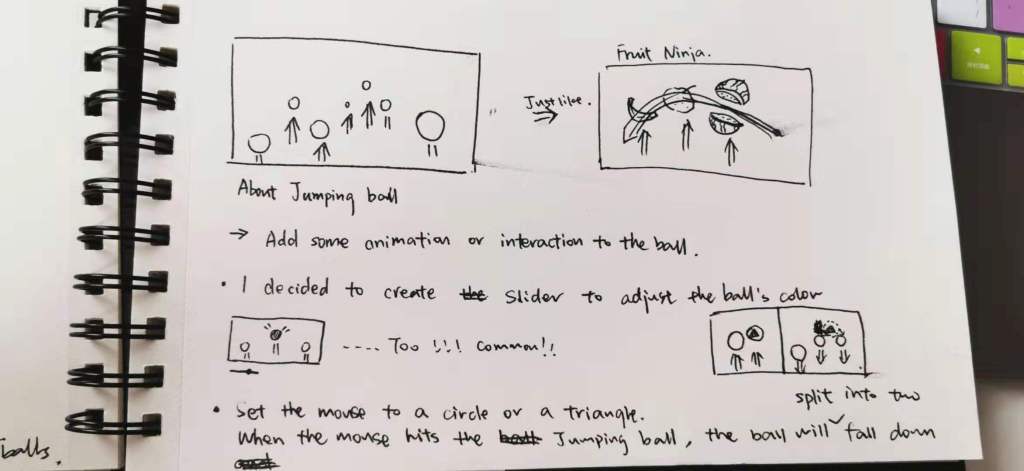
Because I want to make an interactive mini-game, I want to add some animation or interaction on the ball. In fact, I think the Jumping Ball just like Fruit Ninja.


Fruit Ninja is also a game that uses the jumping fruit to interact with human fingers. The player uses a blade controlled by the touch screen to slice the fruit into thin slices. When throwing fruit on the screen, the player slides his finger across the screen to make a slicing action, trying to cut the fruit in half. Multiple swipes can be cut into thin slices with a single swipe, so extra points can be used to make multiple slices at the same time using other fingers. Players must slice all fruits into thin slices; if three fruits are missed, the game will end.
So I decide to create Slider to adjust the ball’s colour, but I think it is too normal. Therefore, I want to make a small game.
In fact, what I want to make is like that :
At first, setting a start button. After clicking it, it will disappear and then the ball start jumping and we can start to play the game.
Secondly, trying to use the mouse to touch the ball, and the ball will change colour and divide into two balls.

Setting the mouse to a circle or a triangle. When the mouse hits the Jumping Ball, the ball will split into two and fall down.
What I actually do is

I set up a score. When the mouse touches the ball, the score will increase. The longer the mouse touches, the higher the score will be. And set a restart button.


The score increases when I touch the ball with my hand or mouse. I find a collision detection library for 2D geometry in p5.js. Before people hit it, its colour is pink ,but when people hit it, l set the point will add and it will become black.

And this is my final work

I added a background to make the picture look more cute and changed the colour of the ball to a colour similar to the background.
RULE: Then the rule of this mini game is that when your hand touches the ball, your score will increase and the score will depend on how long you touch the ball. If you touch the fast ball on the right, you will get more points.


 Web
Web 